
Introduction
Use Copilot Chat for WordPress and embed directly in your WordPress intranet or extranet. With the WPO365 Copilot app, authenticated users can start conversations with Copilot without leaving your website, creating a seamless and familiar experience for employees, partners, and other authorized and licensed users.
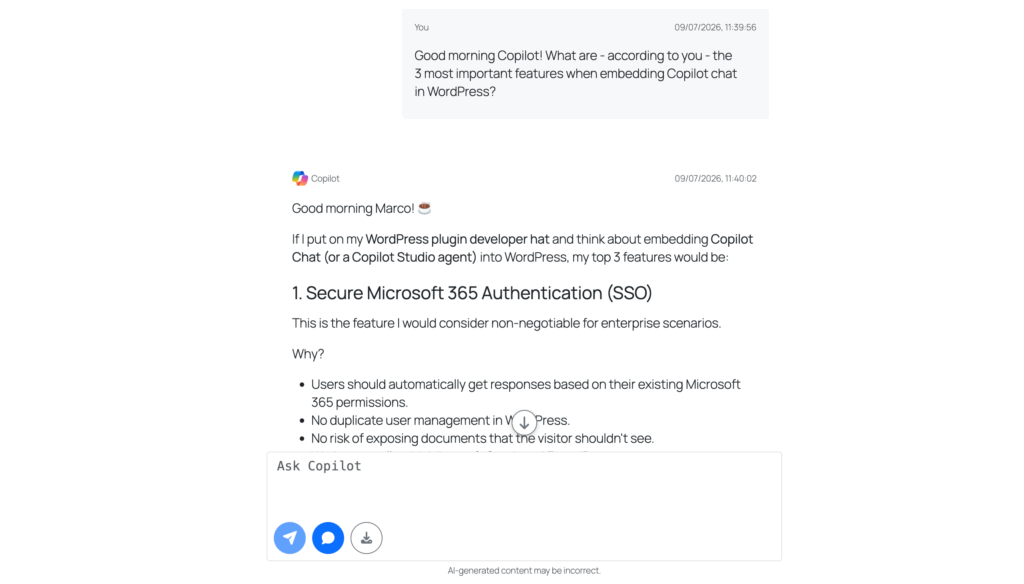
Supported features
Embedded Copilot Chat for WordPress
Bring Microsoft Copilot directly into your WordPress intranet or extranet. Users can start conversations without leaving the website they are already working in.
Microsoft Single Sign-on
Use existing Microsoft Entra ID identities to access Copilot. Users simply sign in through WPO365 Single Sign-on and can start chatting right away.
Download Chat Transcripts
Save an entire conversation as a Markdown file for future reference. This can be useful for sharing information, documenting findings, or keeping personal notes.
Copy Responses
Copy individual Copilot responses to the clipboard with a single click. This makes it easy to reuse information in documents, emails, or WordPress content.
Sources and Attributions
Open a dedicated side panel to view references and source information associated with Copilot’s response. This provides additional context when available.
Sticky Chat Input
Keep the message input visible at the bottom of the screen while reading longer conversations. You can continue asking questions without scrolling back down.
Automatic Scrolling and quick Navigation
The chat automatically focuses on newly received responses so that you can continue reading without manually searching for the latest answer. You can also jump directly to the end of the conversation whenever needed. This is especially helpful during longer chat sessions.
Translation Support
Customize labels, tooltips, messages, and other user-facing text. This makes it easier to adapt the experience to different languages and audiences.
Custom Branding and Styling
Adjust fonts, colors, spacing, and other Bootstrap design variables without modifying code. Small style changes can help the chat blend naturally into your website.
Built for Microsoft 365
The app uses Microsoft Graph and Microsoft Copilot services while remaining integrated with WordPress. Users benefit from Copilot capabilities within a familiar environment.
Plugins with this feature
The following (premium) plugins will install this feature in your WordPress website.
The following legacy plugin will also be updated and install this feature: WPO365 | INTRANET