
Introduction
With Copilot Rewrite for WordPress, authors can select supported Gutenberg blocks and use Microsoft Copilot to generate improved versions of their content without leaving WordPress. Administrators can further guide the generated output by defining enterprise-wide instructions, while individual authors can save their own preferences for tone, audience, length, and style.
Supported features
Rewrite Gutenberg Content
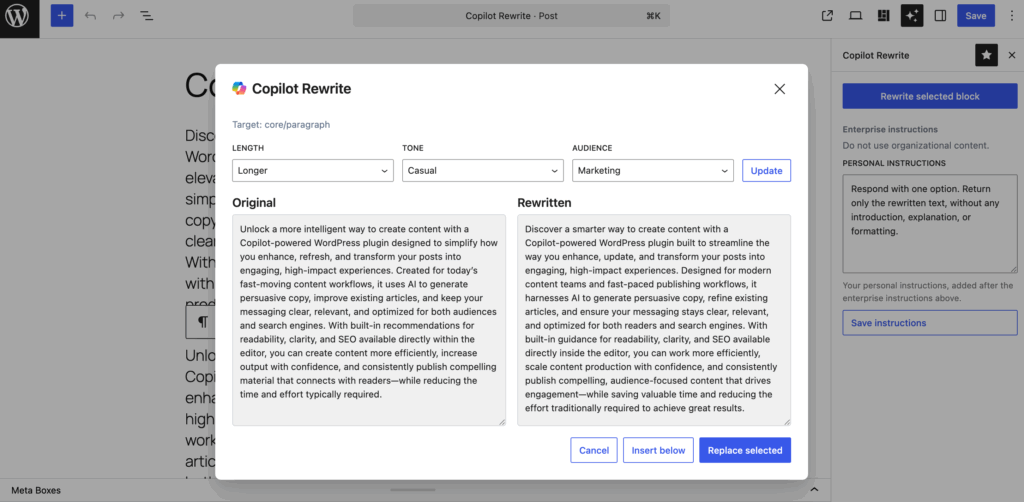
Select a supported block and ask Copilot to create an alternative version. The rewritten text is generated directly from the WordPress editor, without switching to another application.
Side-by-Side Comparison
Review the original text and Copilot’s suggestion side-by-side. This makes it easy to compare changes before deciding whether to use the new version.
Replace or Insert
Choose whether to replace the selected content or insert the generated text below the current block. This gives you flexibility when experimenting with different versions.
Adjust Length
Control how concise or detailed the rewritten text should be. Select between shorter, equal, or longer versions depending on your content goals.
Fine-Tune the Tone
Guide Copilot toward a formal, neutral, casual, or friendly writing style. The selected tone helps shape the final result while keeping the original message intact.
Write for Your Audience
Tailor content for different audiences, such as general readers, technical users, marketers, or executives. Copilot uses this context when generating suggestions.
Request Another Version
Not completely satisfied with the first result? Ask Copilot to generate another version based on the same content and preferences.
Personal Writing Instructions
Provide your own instructions to influence future rewrites. Personal instructions are automatically included with each request, helping Copilot better reflect your preferred writing style.
Enterprise Guidance
Organizations can define enterprise-wide instructions that are automatically applied to all rewrite requests. This helps promote consistency across authors and content.
Saved Preferences
Your preferred length, tone, and audience settings are remembered for future sessions, reducing the need to repeatedly configure the same options.
Built into the WordPress Editor
The rewrite experience is integrated directly into Gutenberg as a dedicated panel. Authors can improve content without leaving the page they are editing.
Plugins with this feature
The following (premium) plugins will install this feature in your WordPress website.
The following legacy plugins will also be updated and install this feature: WPO365 | LOGIN+, WPO365 | SYNC and WPO365 | INTRANET