Take Microsoft 365 email integration for WordPress further. WPO365 | MAIL is the premium extension for organizations that need more control over WordPress email, with advanced email features for auditing, delivery, sender configuration, shared mailboxes, staging and more.

It extends the email functionality included with WPO365 | LOGIN and WPO365 | MS GRAPH MAILER.
More control over WordPress Email
Gain more control over how your WordPress website sends, monitors and manages transactional email through Microsoft 365.
Reliable Email Delivery
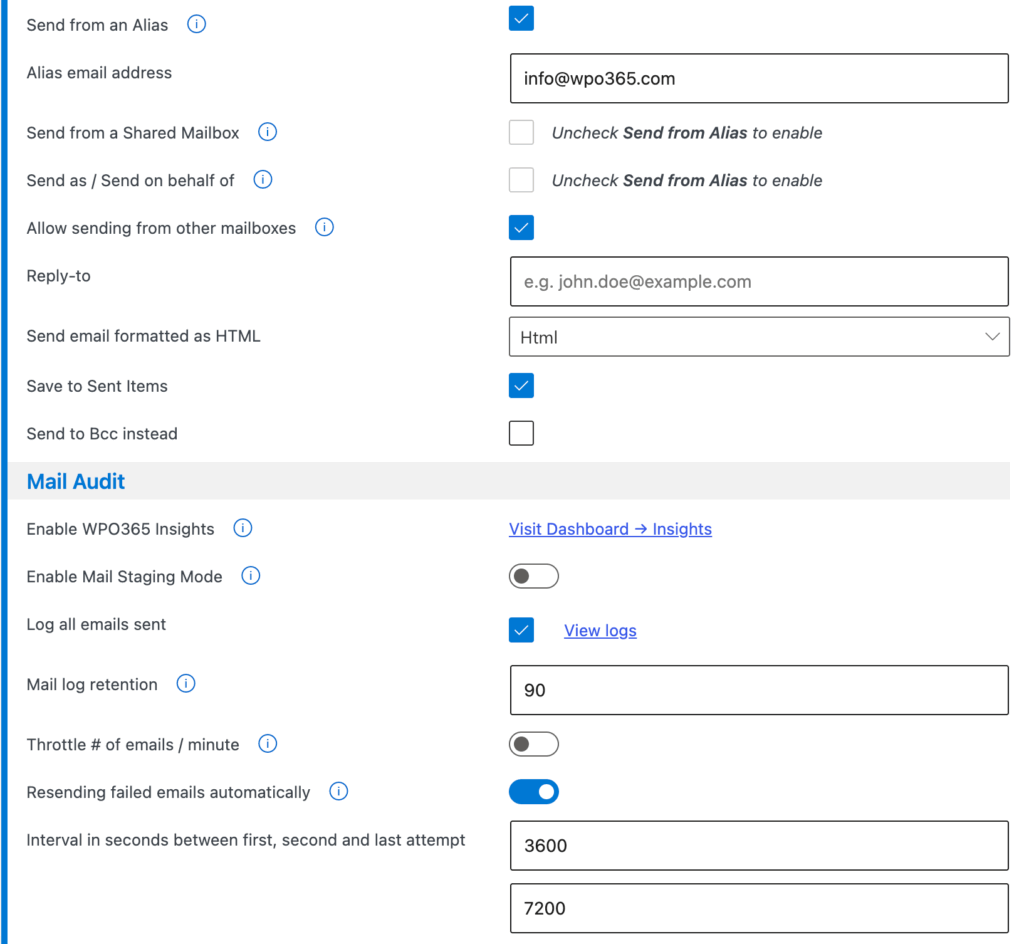
MAIL AUDIT & (AUTO) RESEND
- Log every email sent from your WordPress website, review errors and (automatically) try to send unsuccessfully sent mails again.
LARGE ATTACHMENTS
- Add support to send WordPress emails with attachments larger than 3 MB using Microsoft Graph.
MAIL THROTTLE
- Throttle the number of emails sent from your website per minute.
STAGING MODE
- Mail Staging Mode is useful for debugging and staging environments. WordPress emails will be logged and saved in the database instead of being sent.
Flexibe Sender Options
SHARED MAILBOX
- Send email from Microsoft 365 Shared Mailbox.
SEND AS / SEND ON BEHALF OF
- Send email as / on behalf of another user or distribution list.
SEND FROM ALIAS
- Send emails from an alias address (but submit to Microsoft Graph as the authorized user).
DYNAMIC SEND-FROM
- Allow forms to override “From” address e.g allow Contact Form 7 to dynamically configure the account used to send the email from (requires application-level Mail.Send permissions).
SEND AS BCC
- Send emails as BCC instead and prevent reply-to-all mail pollution.
REPLY-TO
- Configure a default reply-to mail address if this should differ from the account’s mail address that is used to send WordPress transactional emails from.
Security & Administration
STORE ENTRA ID SECRETS IN wp-config.php
- Further improve overall security by choosing to store Azure Entra ID secrets in your WordPress WP-Config.php (on disk) and have those secrets removed from the database.